Priceline: Hotel, Flight & Car
- 4.8
- Rating
- 10.00M
- Installs
- Free
- Price

 Analysis by App-foxy
Planning a trip on a shared household phone can become surprisingly messy. One person is checking hotel rooms, another is comparing flights, and someone else is trying to remember whether a rental car was already reserved. I found Priceline: Hotel, Flight & Car useful in that situation because it brings several major travel searches into one place instead of making everyone jump between separate booking apps. It is a free travel and local app from priceline.com, aimed at booking hotels, flights, cars, and packages.
My overall impression is positive, especially when I want to compare the main parts of a trip quickly. The app is not a replacement for careful reading of cancellation rules, baggage conditions, or vehicle terms, but it can make the first stage of planning much faster. Its biggest strength is convenience; its biggest weakness is that convenience can tempt you to make a booking before checking the details that matter most.
How Priceline works when several people share the planning
A realistic household example is a weekend trip where one adult chooses the destination, another checks the travel dates, and a teenager is asked to look at hotel photos. On a shared device, having hotel, flight, and car searches together is practical. I can move from one part of the trip to another without opening a new service every time, and that makes it easier to keep the dates and destination consistent.
You May Also Like

 Blood Strike: 2.5 Anniversary
Blood Strike’s Loadouts Turn Every Drop Into a Tactical Gamble
A close look at Blood Strike’s custom loadouts: how fast access to signature weapons reshapes its battle royale rhythm, rewards preparation, and narrows the gap between fights.

 Pandora - Music & Podcasts
Pandora’s Music Is Easy to Start, but Harder to Recover
Pandora’s strength is its low-effort path from a seed to a station. Its weak spot is how much confidence it asks you to place in connection, setup, and quiet recovery.

 8 Ball Pool
 Is Built on Rivalries, Rematches, and Routine
A close look at the rivalries, rematches, shared routines, and unanswered safety questions that turn a quick pool match into a persistent mobile community.

 Samsung Music
’s Quiet Strength Is Playing What You Already Own
Its reach comes less from spectacle than from dependable access to a personal library. That simplicity is both the app’s strongest retention engine and its ceiling.

 AccuWeather: Weather Radar
AccuWeather Review: A Quick, Clear Forecast for Everyday Decisions
For everyday plans, the best forecast is the one you can understand quickly. AccuWeather makes rain timing, radar, and local conditions easy to act on, with a few trade-offs.

 Hill Climb Racing
Why Hill Climb Racing Still Turns Crashes Into One More Run
A tiny car, a bumpy hill and one more upgrade: Hill Climb Racing keeps resurfacing because its simple chaos makes every near-miss feel personal.
More From Our News Desk
View All News


That does not mean every part of the process should be handled by everyone. I would let family members help compare locations or room types, but I would keep the final payment and reservation review with the person responsible for the trip. A shared screen is convenient for discussion, while a shared account can create confusion if several people edit searches or assume that a saved option is already booked.
The most useful household habit is to separate browsing from confirming. Use the app together to narrow down choices, then pause before the final step and read the complete conditions. That simple boundary prevents a child, guest, or less experienced traveler from treating a search result as a finished reservation.
The app is also helpful for households that divide travel tasks. One person can focus on flight times, another can compare hotels, and a third can look at car options. I would still write down the chosen dates and passenger details before searching. Small inconsistencies, such as using a departure date for the hotel search or forgetting that a car is needed only for part of the trip, can make a unified travel app feel less organized than it should.
Setting up a shared device without losing control
Priceline is rated for Everyone, which makes it suitable for general household use in an age-rating sense. That does not automatically mean every booking decision should be open to every age group. Travel reservations involve personal information, payment decisions, and commitments that deserve adult supervision. I see the age rating as a statement about general content, not as a recommendation to let a young child book independently.
On a shared phone or tablet, I would begin by deciding who owns the booking process. That person should be the one who checks the traveler names, dates, destination, and final total. Other household members can participate in choosing between options, but the person making the reservation should remain present through confirmation.
This approach matters because travel searches can look very similar even when the terms differ. A hotel may have different cancellation conditions from another room in the same property. A flight may have baggage rules that change the real cost. A car result may involve restrictions that are easy to overlook while scrolling. The app makes comparison convenient, but it cannot replace a household rule about who has authority to confirm.
I also recommend treating the app as a planning workspace rather than a family noticeboard. If several people need the itinerary, share the confirmed reservation details through the household’s normal communication method after checking them. Do not assume that a search screen, a partially completed form, or a result left open on a shared device is an official itinerary.
For an older child or teenager, the app can be a useful learning tool. They can compare hotel locations, think about how flight times affect the day, and understand why a rental car may or may not be worthwhile. I would use those activities to teach practical travel judgment, while keeping payment information and final confirmation under adult control.
Coordinating hotels, flights, and cars in one workflow
The combined travel categories are where Priceline feels most useful. Instead of treating a trip as three unrelated searches, I can think through the whole journey: how I will arrive, where I will sleep, and whether I need transport after landing. This is particularly helpful for road trips, airport stays, and vacations where public transport is not convenient.
My preferred workflow is to start with the least flexible part of the trip. If the flight dates are fixed, I check those first. Then I search for a hotel that fits the arrival and departure pattern, and only after that do I decide whether a car is necessary. This avoids paying for a vehicle during days when it would sit unused outside a hotel.
For a family trip, I would also compare the hotel’s location against the planned activities rather than choosing only by nightly price. A cheaper room far from attractions can create extra transport costs and more coordination work. The app helps put options in front of me, but the decision still depends on the shape of the trip, not just the first attractive result.
Packages can be appealing when I want to organize several elements together, but I would not assume that combining products is always the best choice. Separate bookings may offer more flexibility if one traveler changes plans. A package may simplify the search, while individual reservations can make it easier to adjust one part without disturbing the others. I would compare both approaches when the dates are uncertain.
One non-obvious advantage is that the app encourages me to notice connections between bookings. A late arrival can affect whether a hotel check-in is practical. An early flight can make a distant hotel less convenient. A rental car can change which neighborhoods are realistic. Looking at these details in one travel app makes it easier to catch scheduling problems before they become expensive.
There is also a trade-off. A single app can make the search feel complete even when I have not checked every relevant condition. I still compare important flight details with the airline’s own information and examine hotel or car terms carefully. Priceline is excellent for narrowing choices, but I would not use the first result as the final answer without a deliberate review.
What I check before trusting a reservation
When I use the app, I pay attention to the difference between a low displayed price and the actual suitability of the booking. For hotels, I check room occupancy, bed arrangement, cancellation terms, and location. For flights, I look at departure times, connections, baggage expectations, and the names entered for travelers. For cars, I consider the pickup location, the driver requirements, and whether the vehicle is appropriate for the route.
These checks are especially important on a shared device because different family members may notice different parts of a listing. One person may focus on the room image, while another notices the cancellation wording. I prefer to read the conditions aloud when planning as a group. It is slower, but it reduces the chance that someone agrees to an option without understanding the restriction.
I also avoid relying on memory between searches. If I compare a hotel in the morning and a flight later, I record the exact dates and times in a household note before switching tasks. This is a simple but effective workflow improvement. It prevents the common mistake of building an itinerary from several searches that were made with slightly different assumptions.
Another useful tip is to compare the total travel pattern, not just each individual product. A hotel that looks inexpensive may require a car, while a more central hotel may reduce transport needs. A flight arriving at an awkward hour may force an extra night. Priceline gives me a convenient starting point for these comparisons, but the best choice comes from adding the practical consequences together.
Age, trust, and account boundaries
Because the app is intended for Everyone, I would be comfortable showing it to most members of a household. Still, I would keep a clear line between viewing information and taking action. A young user can help identify a hotel with a pool or a flight at a preferred time, but an adult should verify the final details before any reservation is made.
That boundary is not about distrusting family members. It is about the nature of travel purchases. A booking can involve dates, names, contact details, and payment decisions. On a device used by several people, accidental taps or misunderstandings are more likely than when one person plans alone.
I would also avoid leaving a booking session open for everyone to inspect later. If the household needs to discuss an option, I would show it deliberately and close the process afterward. The app is designed for travel shopping, not as a substitute for a shared family calendar or a controlled document system. Keeping those roles separate makes coordination clearer.
For teenagers, Priceline can teach useful skills: comparing locations, recognizing inconvenient times, and asking whether a car is genuinely needed. I would encourage them to explain why they prefer one option, rather than simply choosing the cheapest one. That turns the app into a practical planning exercise without handing over responsibility for the final purchase.
Adults who are less comfortable with travel apps may appreciate the unified layout, but I would still walk them through the confirmation stage. The app reduces the number of services involved, yet it does not remove travel terminology or booking conditions. A shared review is worthwhile when one person is unfamiliar with flights, hotels, or rental cars.
Performance, availability, and everyday practicality
The app has been available since November 10, 2010, and its current Android version is 15.4.373. It requires Android 8.0 or later, so most reasonably recent Android phones should be able to run it. I like that the entry cost is simple: the app itself is free, which makes it easy to install for a particular trip and remove later if I do not use it regularly.
Its scale also gives me confidence that it is not an obscure travel tool. Priceline has more than ten million installs, with an average rating of 4.8 from roughly 569 thousand ratings and about 61 thousand written reviews. Those figures suggest that many travelers find the app useful, although popularity should not replace checking whether a particular booking suits my needs.
In day-to-day use, the main advantage is reducing app switching. I can begin with a hotel search, move to flights, and then consider a car without rebuilding the entire trip in separate services. That is valuable when planning on a small screen, where repeatedly copying dates and destinations becomes tiring.
The main friction is the amount of information involved. Travel results can contain many choices, and the convenience of putting them together does not make the decisions simpler. I sometimes need to slow down and compare the details manually. Someone looking for an extremely minimal booking experience may find the range of options distracting.
Where it beats ordinary alternatives, and where it does not
Compared with using separate hotel, airline, and car-rental apps, Priceline is more convenient for early planning. It gives me one place to explore the broad shape of a trip and makes package-style thinking easier. It is also a sensible choice when I am still flexible and want to see what combinations are available.
Compared with booking directly with an airline or hotel, the app may be less appealing when I already know exactly which provider I want. Direct booking can feel clearer for managing a loyalty relationship, checking provider-specific policies, or handling a change with the company operating the service. In those cases, Priceline is better as a comparison starting point than as an automatic final destination.
Compared with a dedicated map or itinerary app, Priceline is focused on finding and arranging travel products rather than managing every activity after booking. I would use it to make the reservations, then keep the confirmed schedule in whatever calendar or travel organizer the household already understands. Trying to make one booking app handle every coordination task can create unnecessary confusion.
I would skip Priceline if I only need a very specialized travel product, if I am committed to one provider’s direct booking process, or if I dislike comparing several categories at once. I would also be cautious about using it as the sole source of truth for a complicated group trip. For a simple vacation or a first round of research, however, its breadth is genuinely useful.
My household verdict after using it for trip planning
I recommend Priceline for households that want a practical starting point for comparing hotels, flights, cars, and packages in one free app. It is especially useful when several people are discussing a trip on one device and need to see how one decision affects the others. The app from priceline.com has the right scope for that job, and its strong user reception reflects how convenient the combined approach can be.
My recommendation comes with one condition: keep planning collaborative, but keep confirmation controlled. Let family members compare options, ask questions, and explain their preferences. Then have one responsible adult check names, dates, timing, cancellation terms, and the complete cost before booking.
That balance is what makes the app work well in a shared household. It supports coordination without pretending that every traveler has the same role. The Everyone age rating makes it approachable, while the financial and personal nature of reservations calls for sensible adult boundaries.
After using it, I see Priceline as a strong trip-search and booking companion rather than a complete travel-management system. It saves time at the comparison stage, helps connect hotels with flights and cars, and works well for everyday planning. If I need maximum control over one airline or hotel, I may switch to direct booking. If I need a family itinerary afterward, I will use a separate calendar or organizer. For most households beginning a trip search, though, this is an app I would recommend keeping available on the shared device.
FAQs for Priceline: Hotel, Flight & Car
01What is Priceline and how does it work?
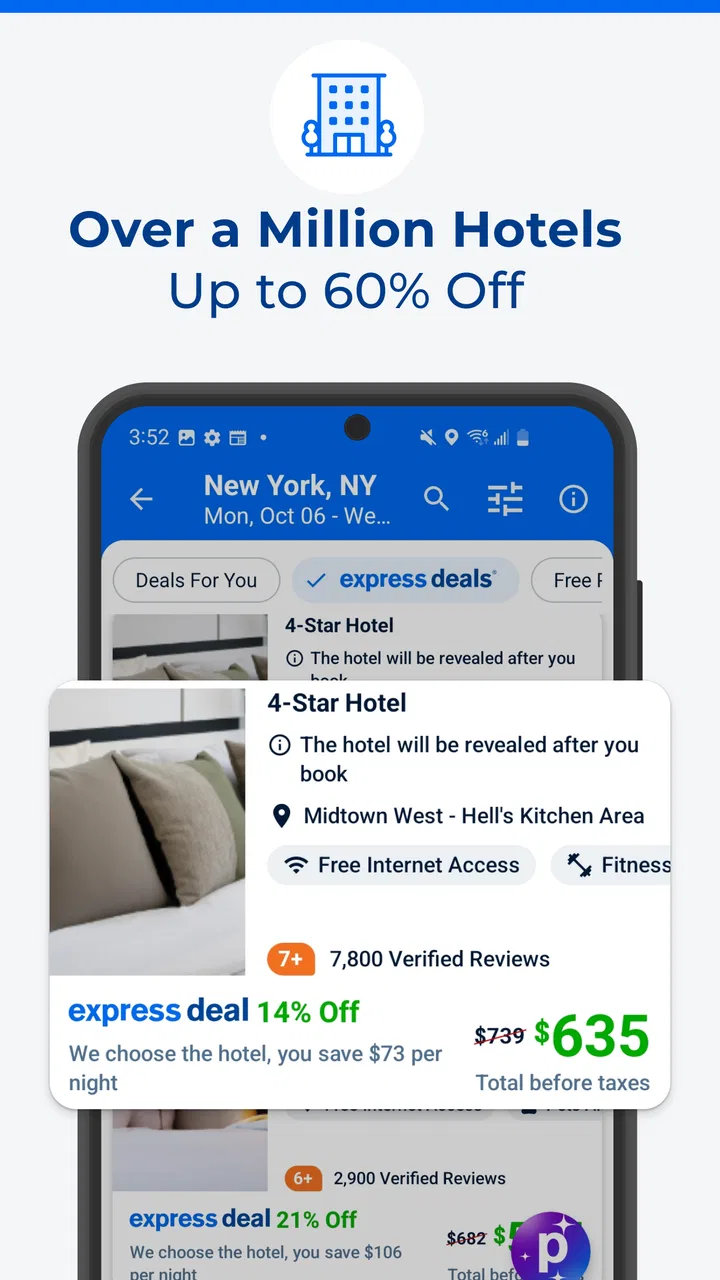
Priceline is a travel app that allows users to book hotels, flights, and rental cars at discounted rates. It offers various booking options, including 'Express Deals' where users can find significant discounts. The app uses a bidding system and negotiates with travel service providers to offer competitive prices, making it a popular choice for budget-conscious travelers.
02Does Priceline guarantee the lowest prices on travel bookings?
While Priceline strives to offer competitive pricing through its 'Pricebreaker' and 'Express Deals' options, it does not guarantee the absolute lowest prices. However, the app is known for offering substantial savings compared to other booking platforms, particularly when users opt for opaque booking options where the exact hotel or flight details are revealed after purchase.
03How reliable is Priceline for last-minute bookings?
Priceline is a reliable option for last-minute travel bookings, offering deals on hotels, flights, and rental cars. The app's 'Tonight-Only Deals' feature provides users with exclusive discounts for same-day hotel reservations, making it convenient for spontaneous travel plans. However, availability and pricing may vary, so flexibility can be key.
04Can I cancel or modify bookings made through Priceline?
Cancellation and modification policies on Priceline vary depending on the travel service provider. Some bookings offer free cancellation within a certain timeframe, while others may incur penalties. It's crucial to review the terms and conditions for each booking carefully. Priceline's customer service team can assist with modifications and cancellations if needed.
05Is it safe to use Priceline for travel bookings?
Yes, Priceline is a secure platform for booking travel arrangements. It uses encryption and other security measures to protect users' personal and financial information. The app is widely trusted and has been in operation for many years, offering a reliable service to millions of travelers. Always ensure you are using the official app or website for transactions.
Pros
- User-friendly interface with intuitive navigation.
- Comprehensive search filters enhance usability.
- Competitive pricing with frequent discounts.
- 24/7 customer support ensures reliability.
- Seamless booking process across devices.
Cons
- Limited rewards program compared to competitors.
- Occasional app crashes on older devices.
- Some hidden fees not disclosed upfront.
- Slow loading times during peak hours.
- Limited options for last-minute bookings.

Priceline: Hotel, Flight & Car
Gallery